
Cobra RX380-EU, RX680-EU and PX650-EU: setup and group matching
Cobra's RX380-EU, RX680-EU and PX650-EU manuals describe three related PMR446 radios with different batteries, controls and privacy-code displays. Before following a setup step, check the exact model and regional suffix on the radio and use its matching EU manual. A similarly named North American FRS model has a different radio authorisation and is not a UK setup reference.
Which EU model are you setting up?
| Manufacturer EU model | Battery and charging path in its manual | Channel and group setting |
|---|---|---|
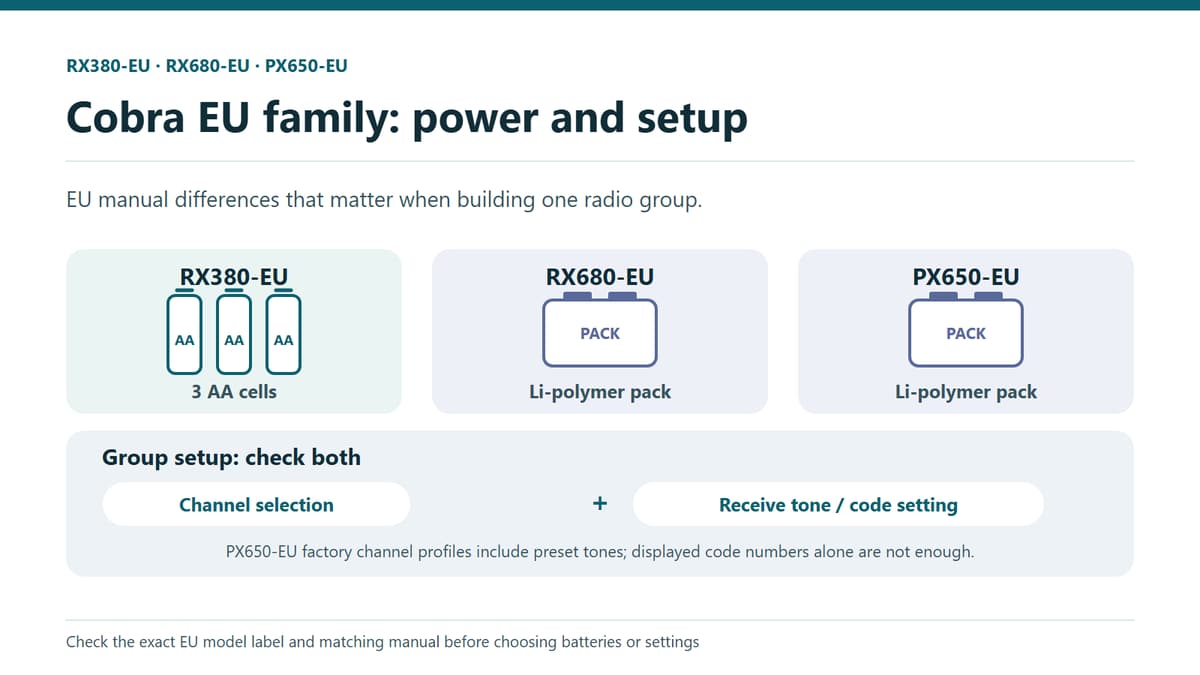
| RX380-EU | Three AA cells. The manual distinguishes suitable rechargeable cells from non-rechargeable alkaline cells; never attempt to charge alkaline batteries. It describes charging compatible cells through the radio's USB-C socket and says the desktop charger is not included. | Turn the top power/volume knob clockwise. Briefly press Mode for a flashing channel number, select with Up/Down, then save with Mode, Talk/Call or the stated standby interval. CTCSS and DCS are separate settings. |
| RX680-EU | A connected rechargeable lithium-polymer battery pack inside the rear compartment. The manual describes a USB-C connection directly to the radio or a desktop charger; check the exact supplied parts before planning a charge station. | Turn the top power/volume knob clockwise. Briefly press Mode, choose the channel with Up/Down, then save with Mode, Talk/Call or the stated standby interval. CTCSS and DCS have separate displays and tables. |
| PX650-EU | A connected rechargeable lithium-polymer battery pack inside the rear compartment. The manual describes direct USB-C and desktop-charger paths, with model-specific red/green charge indications. | Turn the top power/volume knob clockwise. Turn the Channel/Privacy Code Selection knob one step to hear the current channel, then turn it again to select a channel. Press Talk or allow the stated standby interval to save. Its factory channels have preset tone or DCS settings. |
Those descriptions come from the RX380-EU manual, RX680-EU manual and PX650-EU manual. Check the actual radio label and delivered accessories before choosing replacement batteries, headsets or chargers. A twin or quad listing name alone does not establish every item inside an assembled pack.
Why channel 1 may not work with another radio
The PX650-EU manual's factory table assigns a coded-squelch setting to each of its 16 channels. Its channel 1 preset is CTCSS 94.8 Hz, shown as Cobra squelch number 10. A second radio on channel 1 with its receive tone set differently may stay silent even when it is in range. On RX380-EU and RX680-EU, choose the channel with Mode and then check the separate CTCSS or DCS setting; on PX650-EU, hear the announced channel/code and use its FUNC/CODE procedure if you need to change the preset.
Match the channel, code system and underlying tone or DCS value, not just a displayed number. For example, the PX650-EU factory table calls its channel 4 setting DCS 25 and Cobra squelch number 40. The RX680-EU's separate DCS table lists octal DCS 25 under its own DCS number 2. The display numbers 40 and 2 differ, although the manuals identify the same underlying DCS value. Use the exact tables and test a call both ways; do not assume every radio's code index translates in the same way.
For an initial fault check, compare the actual channel and coded-squelch settings on both radios. If the receiving radio's code is set to Off or 00 under its model instructions, it may hear other users on that channel, which helps isolate a tone mismatch; restore the agreed group setting afterward. Privacy codes filter which calls open the speaker. They neither reserve the shared channel nor encrypt the speech. Our privacy codes and encryption guide explains that distinction.
Charge the correct battery in the correct way
The RX380-EU manual uses AA cells and explicitly warns against charging alkaline batteries. It gives a first-use charge example of 14 hours for the specified rechargeables. RX680-EU and PX650-EU instead describe a connected rechargeable pack and an eight-hour first-use charge. Those are instructions from these EU manual editions, not a universal charge time for every pack or replacement. Follow the label, battery and charger supplied with the actual variant. Never substitute a charging part merely because the connector fits.
Charge in a dry place and keep the model's battery and port covers correctly closed for use. The RX680-EU and PX650-EU manuals describe the desktop charger's red light while seated and its light going off on completion; PX650-EU also lists a solid red radio LED while charging and solid green when full. These are different indicator locations, so check the exact manual before diagnosing a fault. For a broader charger-fit checklist, see our radio charger guide. For storage and damaged-pack handling, use our battery-care guide.
Make a reliable group check
- Confirm the exact EU model on each radio and use the matching manual. Record the supplied battery and charging parts for each pack.
- Turn each radio on, select the agreed PMR446 channel and confirm its displayed or announced CTCSS/DCS setting. PX650-EU factory presets need particular attention.
- Set the same underlying tone or DCS value where the group uses coded squelch. Test a short call in both directions, first close together and then at the real work locations.
- Check the site's normal call and response procedure, volume, lock and VOX settings. VOX can transmit when speech or background noise triggers it; a locked keypad can conceal an unexpected setting.
The advertised maximum distance is not a site guarantee. Terrain, buildings and foliage affect reception; the manuals' maximum-range control changes the receiver's automatic squelch behaviour rather than increasing the legal transmit power. For UK PMR446 equipment conditions, see our radio licensing guide.
These models' emergency-alert features signal a radio group on a matched channel and code. They do not connect to emergency services or guarantee that somebody receives or answers. The RX680-EU manual explicitly warns that a group may not respond, and it says other brands may not reproduce its special alert behaviour. Train users on the site's actual emergency procedure and use the alert only as its exact manual and procedure permit.