
Mitex General, General Xtreme and Site: match the fleet and spares
The UHF versions of Mitex General, General Xtreme and Site considered here are distinct full-power radio families. Their names also differ from Mitex 446 licence-free models and from General DMR. Before adding a radio or buying a spare battery, identify its exact model and band on the label, the existing fleet's programmed channels, and the UK authorisation for the intended use.
Choose the right family for the fleet
| Manufacturer family | What Mitex describes | What to confirm before adding one |
|---|---|---|
| General | A 5 W handheld in the manufacturer listing. Mitex describes its factory General suit as working with General Xtreme and Pro units when supplied with the matching original channel arrangement. | The precise model and band, existing fleet channel plan and licence. A used or reprogrammed radio may no longer have those factory settings. |
| General Xtreme | A separate 5 W model described with an IP66 ingress rating. It is not automatically a General DMR or a 446 Xtreme model merely because the names overlap. | The precise band, compatible analogue channel plan and whether the specified General Xtreme battery and charging pod fit the actual revision. |
| Site | A 5 W UHF construction-site family, supplied by Mitex as its own site-oriented suit. Its product page describes protection from dust and water without specifying an exact IP number. | The Site suit's channel plan, authorised operating area and Site-specific battery and charging pod. Do not infer the General Xtreme IP66 rating for Site. |
The Mitex family overview says radios of the same factory suit are set up to talk together and describes channels 13–15 as shared across its full-power UHF units. Its General, General Xtreme and Site pages describe those families separately. Treat the factory channel statement as a starting point, not a guarantee for a particular second-hand, reprogrammed or differently revised radio. Compare the actual channel plan, analogue/digital mode and call settings, then test both directions with the operating fleet.
General Xtreme's IP66 description concerns ingress protection. It does not establish suitability for an explosive atmosphere; HSE explains the separate Ex equipment marking and conformity process. For an industrial site with a classified hazardous area, have the responsible safety team approve the exact complete radio and accessories before use.
Preprogrammed does not mean licence-free
Mitex describes these full-power radios as preprogrammed, but the separate Mitex 446 family is its lower-power licence-free range. For a UK business-radio system, the responsible licence holder must confirm that the actual frequencies, power and operating arrangement fit the licence. Do not transmit merely because a radio arrives with a channel selected. Ofcom's Business Radio guidance explains the licensing routes; our UK radio licensing guide covers the broader decision.
The separately named General DMR has documented analogue and DMR modes. That does not give an analogue General or General Xtreme radio DMR capability. If the fleet is digital, record the exact radio model, mode, channel, DMR group settings and authorised programming before ordering; our analogue and digital compatibility guide explains the matching checks.
Match batteries, pods and power supplies by family
Mitex lists a General/Security/Pro/446/446Pro 1300 battery group, a General Xtreme/446 Xtreme2 battery group, and a separate Site battery group. A higher capacity number or similar case shape does not establish that a pack will fit or charge safely. Its exact General-family 1300 mAh battery page names its compatible families; it does not add Site or General Xtreme to that list.
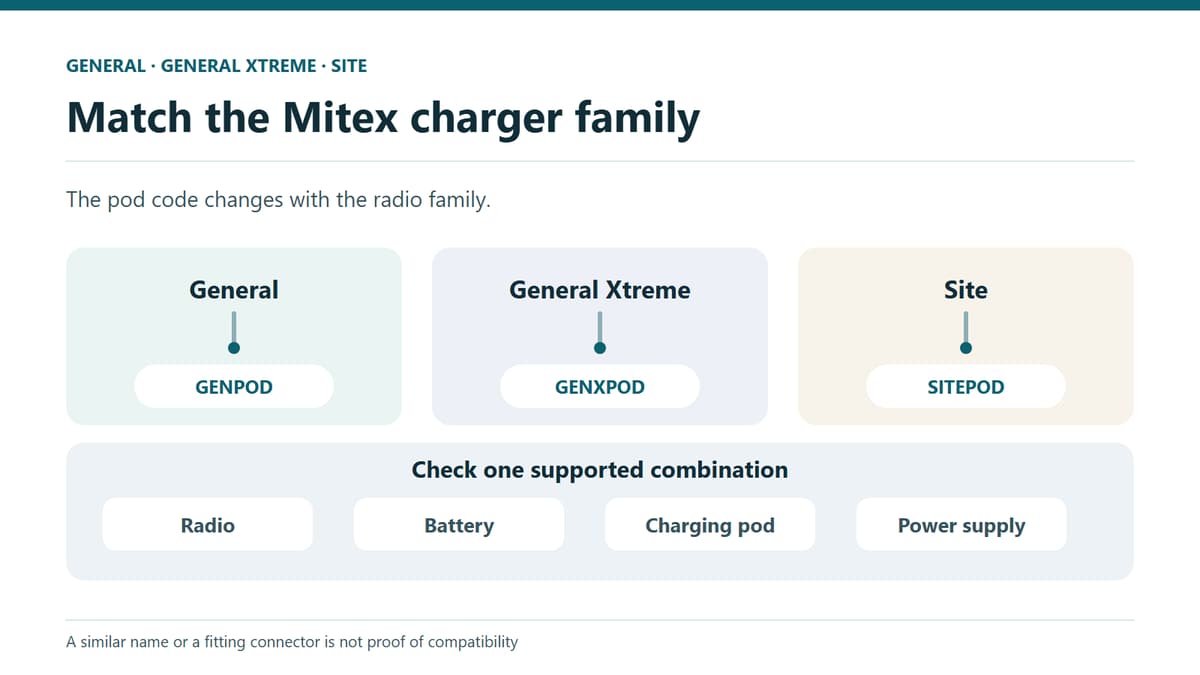
The Mitex charger list separates the single-radio GENPOD for General, GENXPOD for General Xtreme and SITEPOD for Site. It also lists distinct six-way charger families and separate six-way and single-charger power supplies. A replacement PSU alone is not a complete charging bank, and a model-like string on a generic supply is not evidence of its electrical or connector compatibility. Check the manufacturer's exact assembly, output label, plug and mains lead against the charger actually held. Our charger and UK power guide gives the full checklist.
What to record before a replacement or fleet addition
- Read the label on the existing and proposed radios: model family, band, revision and condition. Ask the fleet administrator for the current licensed channel plan and whether any radios have been reprogrammed.
- Confirm analogue or DMR operation and all group settings. Make a short two-way test call on the intended authorised channel, including the sites where the team works.
- For a spare battery or dock, identify the exact battery part and pod family from the radio and charger documentation. Check the power supply as a separate item.
- For a twin or single pack, confirm the actual offered contents, charging parts and any programming service in the quote. A manufacturer example pack does not establish the contents of every retailer's assembled offer.
Use the exact current operating manual for button sequences, indicator meanings, fault codes and maintenance. If the radio's model label or programming history is unclear, resolve those details before changing its configuration or ordering a replacement charging part.