
Body-worn cameras: plan the evidence workflow before choosing a device
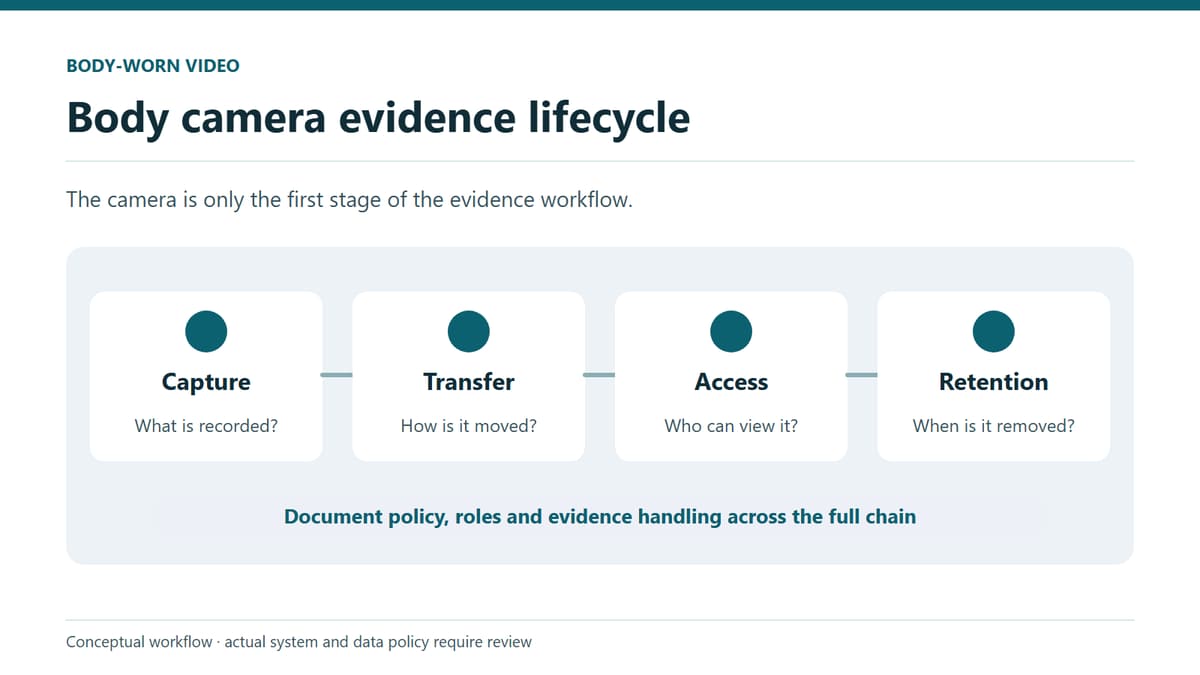
Choose a body-worn camera as an evidence workflow, not a camera alone. Map what is captured, how footage leaves the device, who may view or export it, and when it is deleted. Recording, live streaming, docking, cloud storage and evidence management are separate capabilities and commercial components. Confirm the exact camera, software tier, dock, network, storage and support terms in the quote before deployment.
Follow footage from capture to deletion
| Stage | Question to settle | Evidence to request |
|---|---|---|
| Capture | Which events start recording? Are audio, pre-record buffering, GPS and wearer alerts enabled? | Exact device/version settings, issue policy, battery and storage assumptions. |
| Transfer | Does the camera offload by dock, cable, Wi-Fi or a managed service? Is live video needed? | Dock and network parts, transfer route, encryption and failure/retry behaviour. |
| Access | Who can view, tag, redact, export, disclose or delete footage? | Named roles, authentication, audit trail, export format and subject-access process. |
| Retention | How long is each recording needed, and what happens to an incident hold? | Purpose-based schedule, secure deletion and recovery/backup policy. |
A body camera may keep its main recording on local storage while using a lower-resolution stream for live viewing. In Motorola's VB400 data sheet, the named model lists local recording options up to 1080p but Wi-Fi streaming at 640 × 360; the same sheet describes configurable pre/post-record buffering and GPS whose performance depends on location and use. These are VB400 specifications, not a promise about another camera, a particular merchant offer or continuous live coverage. Ask how the chosen set behaves when wireless service is unavailable and how full-quality footage is later transferred.
Decide when video and audio are justified
The ICO's body-worn video guidance treats a camera worn close to people as more intrusive than ordinary fixed CCTV. Before procurement, define the specific purpose, complete a data protection impact assessment (DPIA), decide when staff may activate recording and provide practical privacy information such as signage, verbal notice or a visible indicator. Continuous capture and pre-record buffers need particular justification; a buffer should not capture more than intended. Sensitive settings such as homes, schools and care homes need stronger justification.
Video and audio should be assessed separately. The ICO advises a system in which they can be controlled independently, with audio switched off by default unless there is an evidenced need. A manufacturer's available microphone, GPS or buffer feature does not mean an organisation should enable it. The VB400's audio policy, for example, can include or exclude sound during pre-record; the precise option depends on the configured model and software. Document how a wearer knows whether sound and video are active, and test that the notice and controls work in the actual setting.
Privacy information is not the same as consent
Give people clear information about who is recording, why, and how to find the full privacy notice. The controller must identify and document the appropriate lawful basis for its own use. ICO surveillance guidance says genuine consent is often difficult to obtain from people filmed in public spaces; it does not make consent a universal prerequisite or automatically establish another lawful basis. If the actual use processes special-category or criminal-offence data, the controller must assess the additional applicable UK GDPR and Data Protection Act conditions; an Article 6 basis alone does not settle those cases. This depends on the processing, not merely on someone appearing in ordinary footage. Consider staff, visitors and bystanders, including people who may be captured incidentally. The controller's policy should address requests for access, third-party redaction and authorised disclosure. Current ICO guidance is under review following the Data (Use and Access) Act, so check it again before a final policy is approved.
Plan the dock, software and service separately
Ask whether a dock is only a charger or also a managed offload point, and whether a server, network controller, cloud account or evidence platform is required. Motorola's VB400 sheet lists one-port and 14-port docks as separate accessories and says the named camera requires a VideoManager EX licence. Its VideoManager licensing sheet describes a device licence for each camera and additional cloud storage, with on-premises and cloud tiers. That is a manufacturer product structure, not a Sync Comms subscription, included licence or price. Check the actual camera/software version, number of users and devices, offload capacity, storage location, retention controls, software assurance, renewal and exit/export arrangements in the offer.
For a larger fleet, test whether the chosen dock and system can issue cameras to named wearers, synchronise time, report failed transfers and keep an auditable chain when footage is exported. Test access roles, multifactor authentication where supported, key management, incident preservation and third-party redaction before the system is relied upon. Motorola's datasheets describe device audit logs, protected downloads and role controls for their named system; these features are not evidence that every camera or software tier has them. The ICO's security and retention checklist calls for restricted access, usable exports with time/date information, a purpose-based retention period and secure deletion. There is no universal 30-day retention rule for all body-camera footage.
What must the quote and handover say?
- The exact camera model, regional variant, mounts, batteries, charger/dock, connectivity and whether each item is supplied.
- Which functions work locally, which need Wi-Fi or mobile data, and what happens when the connection or evidence server fails.
- The software edition, per-device/user/storage licences, term, renewal, updates, data location, export and end-of-contract arrangements.
- Who is responsible for DPIA, privacy notice, recording policy, training, access roles, redaction and retention.
- Exact manufacturer and seller warranty, repair, support hours, response route and replacement-camera process stated in the actual offer.
Run a controlled pilot with the intended uniforms, lighting, noise and network, checking both recordings and the full transfer, access and deletion chain. Set the policy and training before routine issue; a camera's available features cannot settle the organisation's legal and evidence-handling choices.